Short answer: for most hobbyists, side-hustle sellers, and schools working with wood, acrylic, leather, and paper, yes — the Creality CR-Laser Falcon 10W is one of the most sensible entry points into laser engraving in 2026. It’s affordable, easy to set up, and powerful enough to cut and mark a wide range of everyday materials without the learning curve or price tag of an industrial system.
It won’t replace a metal-marking fiber laser or an enclosed CO2 cutter for heavy production work, but for personalized gifts, wooden signs, keychains, school projects, and small-batch branded products, it earns its price quickly. That’s exactly why it’s become a popular first machine across India in 2026, and why 3DProtoFarm — a trusted supplier of genuine Creality, Elegoo, and Anycubic equipment — regularly recommends it to first-time buyers.
1. What is the Creality CR-Laser Falcon 10W?
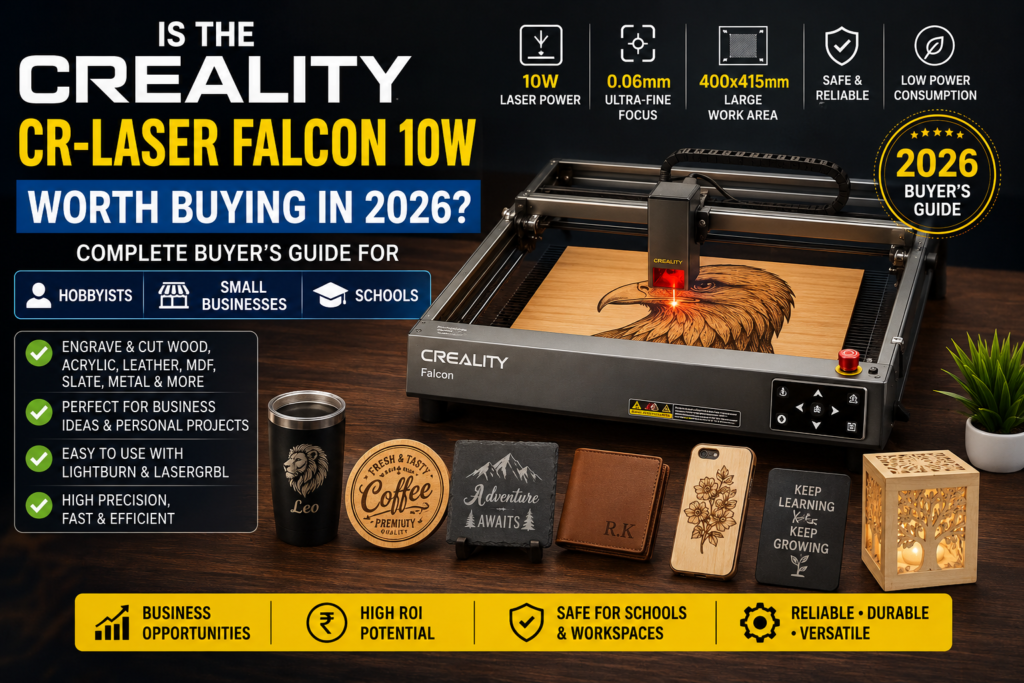
The CR-Laser Falcon 10W is an open-frame diode laser engraver built for hobbyists, small businesses, and educational use. Its open design keeps the machine compact and affordable while giving users a clear, unobstructed view of the workpiece during a job — useful for spot-checking engraving depth and alignment mid-run.
Target users range from complete beginners doing their first engraving projects to small business owners producing personalized products in batches. Setup is quick: most buyers are running their first job within an hour of unboxing, since the frame arrives largely pre-assembled and pairs easily with free software like LightBurn or Creality’s own laser software.
Because it’s an open-frame machine, safety features matter. The Falcon 10W includes a physical safety key switch, a laser warning label, and support for safety glasses and flame-resistant work surfaces — but as with any open-frame laser, proper ventilation, safety glasses, and never leaving a running job unattended are non-negotiable.
2. Technical Specifications Explained
| Specification | Detail |
| Laser Power | 10W output power |
| Working Area | Approx. 400 x 400 mm (expandable with add-ons) |
| Accuracy | 0.01mm positioning accuracy |
| Supported Materials | Wood, acrylic (light colors), leather, paper, cardboard, coated metal |
| Software Compatibility | LightBurn, Creality Laser software, LaserGRBL |
| File Formats | SVG, DXF, BMP, JPG, PNG, NC/Gcode |
| Connectivity | USB, offline controller/SD card support |
| Safety Features | Physical key switch, warning labels, compatible enclosure accessories |
In practical terms: the 10W power rating means fast engraving on wood and leather and reliable cutting on thinner materials, though thick hardwood or dark acrylic will need multiple passes. The 0.01mm accuracy is more than sufficient for detailed text, logos, and fine linework. LightBurn compatibility matters most for serious hobbyists and small businesses — it’s the industry-standard software with far more control than most bundled tools.
3. What Materials Can It Engrave and Cut?
| Material | Engrave | Cut | Recommended |
| Wood | Yes | Yes (thin) | Excellent |
| MDF | Yes | Yes (thin) | Excellent |
| Bamboo | Yes | Yes (thin) | Excellent |
| Leather | Yes | Yes | Excellent |
| Acrylic (Dark) | Yes | Limited | Good |
| Paper | Yes | Yes | Excellent |
| Cardboard | Yes | Yes | Excellent |
| Fabric | Yes | Limited | Good (test first) |
| Slate | Yes | No | Good |
| Ceramic | Yes (coated) | No | Limited |
| Stainless Steel | Marking only | No | Limited |
| Aluminum | Marking only (coated) | No | Limited |
| Glass (Coated) | Yes | No | Good |
The clearest limitation: this is a diode laser, not a fiber laser, so cutting light-colored or clear acrylic reliably is difficult since the beam passes through rather than absorbing. Dark or black acrylic works better for engraving. Bare metal cutting isn’t possible — stainless steel and aluminum can only be surface-marked, and even that typically needs a marking spray or coated stock for good contrast.
4. Who Should Buy This Machine?
Hobbyists
A natural fit for makers who want to personalize gifts, home décor, or craft projects without a steep learning curve.
Students
Affordable enough for personal projects, with software that’s genuinely useful to learn for design and engineering coursework.
Schools
Works well in supervised maker labs teaching design thinking, CAD-to-physical workflows, and basic fabrication — provided ventilation and safety protocols are in place.
Makerspaces
A budget-friendly addition that lets members prototype signage, enclosures, and personalized items without competing for time on pricier CNC or industrial laser equipment.
Small Businesses
A low-capital way to test a personalized-products line before committing to a larger, more expensive laser system.
Gift Shops
On-demand personalization — names, dates, logos — adds a premium to otherwise ordinary stock items.
Custom Product Sellers
Etsy and Instagram sellers use it to produce made-to-order wooden signs, keychains, and engraved accessories with minimal turnaround time.
Home Businesses
Compact enough for a spare room or garage setup, with ROI often reached within the first few dozen paid orders.
5. Best Business Use Cases
- Customized gifts — names, dates, and photos engraved on wood or leather
- Wooden signs — home décor, business signage, welcome boards
- Keychains — a fast-turnaround, low-material-cost product line
- Corporate gifts — branded pens, plaques, and desk accessories
- Wedding products — invitations, favors, and personalized keepsakes
- School projects — student ID tags, award plaques, project models
- Branding — logo engraving on packaging inserts and product tags
- Promotional products — branded merchandise for events and giveaways
- Home décor — engraved coasters, wall art, and photo frames
- Personalized products — one-off or small-batch made-to-order items
Sellers running these product lines commonly report recovering the machine’s cost within their first one to two months of consistent orders, since material costs per piece are low and personalization commands a real price premium.
6. Real Pros & Cons
| Pros | Cons |
| Affordable entry point into laser engraving | Open frame means more safety precautions needed |
| Fast setup, beginner-friendly | Cannot cut clear or light acrylic reliably |
| Strong LightBurn/software compatibility | No bare-metal cutting |
| Good accuracy for detailed work | Ventilation/fume extraction not included by default |
| Wide material compatibility for the price | Multiple passes needed on thicker materials |
| Compact footprint for home or small studio use | Not suited for high-volume industrial production |
7. Comparison with Other 10W Laser Engravers
| Feature | Creality CR-Laser Falcon 10W | xTool D1 10W | Atomstack A10 Pro |
| Price | Most competitive | Higher | Mid-range |
| Accuracy | 0.01mm | 0.01mm | 0.02mm |
| Software | LightBurn, Creality software | LightBurn, xTool Creative Space | LightBurn, Atomstack software |
| Safety | Key switch, warning labels | Key switch, enclosure optional | Basic safety features |
| Speed | Fast for the price tier | Fast | Moderate |
| Value | Excellent for beginners/small business | Strong but pricier | Good budget option |
| Warranty | Standard manufacturer warranty via authorized sellers | Standard warranty | Standard warranty |
| Best User | Hobbyists, schools, small businesses | Prosumers wanting polish | Budget-conscious beginners |
All three are capable 10W diode lasers, but the Falcon 10W consistently comes out ahead on value: it undercuts the xTool D1 on price without a meaningful drop in accuracy, and it offers stronger software support and safety features than the Atomstack A10 Pro. For most Indian buyers prioritizing cost-effectiveness and genuine local support, the Falcon 10W is the more sensible pick.
8. Running Cost & Maintenance
- Electricity usage — roughly comparable to a small household appliance; running costs stay low even with daily use
- Lens cleaning — wipe the protective lens regularly to prevent power loss from residue buildup
- Maintenance — periodic belt tension checks and rail cleaning keep engraving accuracy consistent
- Replacement parts — lenses, belts, and nozzles are inexpensive and widely available
- Air Assist — strongly recommended for cutting jobs; improves cut quality and reduces charring
- Safety glasses — mandatory for every session, not optional
- Smoke extraction — a basic fan or extraction setup is essential for indoor use, especially with wood and MDF
- Expected lifespan — with routine care, several years of regular hobbyist or small-business use
- Monthly operating costs — modest: mainly electricity, occasional lens/belt replacement, and material costs
9. Frequently Asked Questions
Is the Falcon 10W good for beginners?
Yes. Setup is fast, the learning curve is gentle, and LightBurn’s guided workflow makes the first few projects straightforward even with no prior laser experience.
Can it cut acrylic?
It can cut dark or black acrylic reasonably well, but clear or light-colored acrylic is difficult for any diode laser to cut cleanly, including this one.
Can it engrave metal?
It can mark coated or treated metal surfaces (stainless steel, aluminum) but cannot cut or deep-engrave bare metal — that requires a fiber laser.
Can schools use it?
Yes, in supervised maker-lab settings with proper ventilation, safety glasses, and adult supervision during operation.
How much electricity does it consume?
Very little — comparable to a small household appliance, making it inexpensive to run even for daily small-business use.
Does it need Air Assist?
For engraving, it’s optional but helpful. For cutting jobs, Air Assist is strongly recommended to reduce charring and improve edge quality.
Can I use LightBurn?
Yes. The Falcon 10W is fully compatible with LightBurn, which most serious users prefer over bundled software for its precision and flexibility.
What computer is required?
Any modern Windows or Mac laptop with a USB port is sufficient. No specialized hardware is needed.
How much maintenance is needed?
Minimal — periodic lens cleaning, belt checks, and rail cleaning are typically all that’s required for consistent performance.
Where can I buy genuine accessories?
Genuine Creality accessories, replacement lenses, and Air Assist kits are available through 3DProtoFarm’s verified product listings.
Is it suitable for a small business?
Yes, particularly for personalized products, signage, and gifting businesses where order volumes are moderate rather than industrial-scale.
Where can I buy the Creality CR-Laser Falcon 10W in India?
3DProtoFarm stocks genuine units with manufacturer warranty, technical support, and fast shipping across India.
10. Where to Buy in India
For buyers in India, purchasing through an authorized supplier matters — it’s the difference between getting genuine hardware backed by warranty support and risking a grey-market unit with no recourse if something goes wrong. 3D Printer Store India stocks the genuine Creality CR-Laser Falcon 10W, along with technical support, warranty coverage, expert buying guidance, and fast shipping across the country.
Buyers scaling up beyond entry-level engraving often move on to more powerful enclosed systems as their product line grows — 3DProtoFarm’s catalog covers that full upgrade path, so support doesn’t stop at the first purchase.
11. Conclusion
The Creality CR-Laser Falcon 10W is worth buying for hobbyists, students, schools, makerspaces, and small businesses working primarily with wood, leather, paper, and dark acrylic. It’s affordable, fast to set up, backed by strong software support, and genuinely capable of producing sellable, professional-looking work.
It’s not the right choice for anyone needing to cut clear acrylic reliably, mark bare metal at scale, or run high-volume industrial production — those use cases call for a fiber laser or an enclosed CO2 system instead. For everyone else looking for a capable, budget-friendly first laser, the Falcon 10W delivers excellent value.