Enclosed CoreXY printers have become the default choice for anyone serious about 3D printing in 2026. Multi-color capability, high-speed motion systems, and professional-grade reliability used to cost a fortune — now three strong contenders are fighting for the same buyer in India.
This Anycubic Kobra X vs Bambu Lab P1S comparison looks at where each machine actually wins, not just what the spec sheet claims. We’ll also bring Creality’s K2 Plus into the mix, since the Kobra X vs Creality K2 Plus debate comes up just as often among Indian buyers picking their first serious CoreXY printer. If you’re still weighing FDM against other processes entirely, our guide on FDM vs SLA vs SLS printing technologies is worth a look before you commit.
Quick Comparison Table
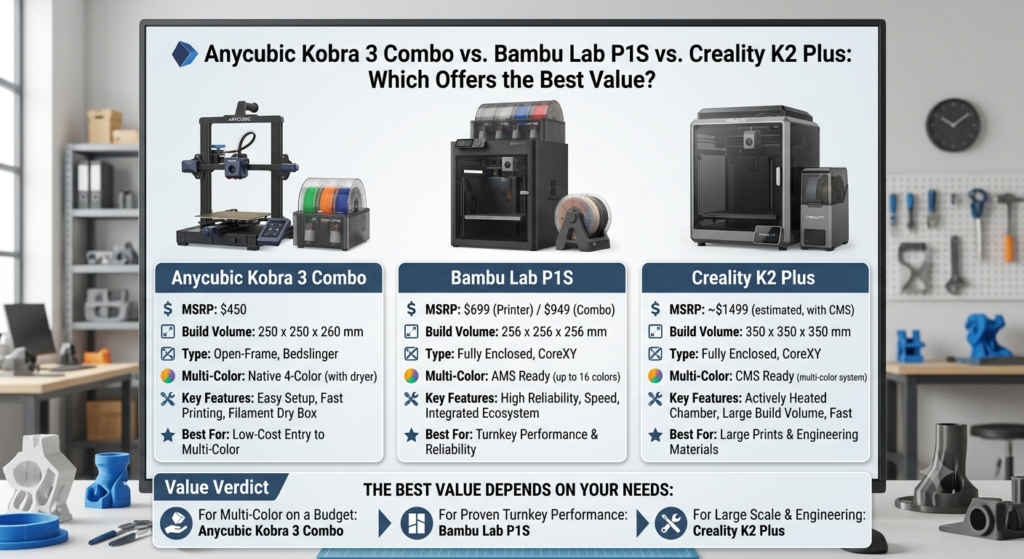
| Feature | Anycubic Kobra X | Bambu Lab P1S | Creality K2 Plus |
|---|---|---|---|
| Price | Lowest entry cost | Mid-range | Highest, justified by size |
| Build Volume | 250 x 250 x 260 mm | 256 x 256 x 256 mm | 350 x 350 x 340 mm |
| Max Speed | 600 mm/s | 500 mm/s | 500 mm/s |
| Multi-color | Yes, with Combo (ACE Gen 2) | Yes, with AMS | Yes, with CFS |
| Max Nozzle Temp | 300°C | 300°C | 350°C |
| Camera | Built-in | Built-in | Built-in |
| Auto Leveling | LeviQ 3.0 | Automatic calibration | Automatic leveling |
| AI Features | Spaghetti detection | Failure detection, AI monitoring | AI camera, failure detection |
| Material Support | PLA to PETG-CF | PLA to PA-CF | PLA to Nylon and PC |
| Best User | Budget-conscious speed buyers | Balanced all-rounders | Large-format professionals |
Price Comparison
The Anycubic Kobra X is the most affordable of the three, making it the easiest entry point for buyers testing high-speed CoreXY printing for the first time.
The Bambu Lab P1S sits in the middle, offering a mature ecosystem that justifies its higher price with software polish and AMS reliability. The Creality K2 Plus costs the most upfront, but its larger build volume and higher nozzle temperature spread that cost across more capability per print.
Long-term ownership favors whichever machine matches your actual workload. Buying the K2 Plus for small single-color parts wastes its size advantage, just as buying the Kobra X for oversized batch production means constant plate splitting.
Build Volume
Build volume is where the Creality K2 Plus pulls ahead clearly, with 350 x 350 x 340 mm of space — enough for large cosplay pieces, big engineering brackets, and batch printing multiple parts per plate.
The Bambu Lab P1S and Anycubic Kobra X sit closer together, both suited to standard prototypes, functional parts, and smaller cosplay components. For engineering teams printing multiple small parts per job, the K2 Plus reduces the number of print runs needed.
Print Speed
On paper, the Kobra X leads with a 600 mm/s max speed claim, ahead of both the P1S and K2 Plus at 500 mm/s. In practice, real-world speeds across all three land closer together, usually in the 300–450 mm/s range for reliable, high-quality output.
Acceleration and frame rigidity matter more than the peak number. All three use CoreXY motion systems designed to stay accurate at speed, and reliability at high speed comes down to well-tuned print profiles rather than raw specs alone.
Multi-Color Printing System
Anycubic’s ACE Gen 2, Bambu’s AMS, and Creality’s CFS all solve the same problem differently.
ACE Gen 2 is straightforward to load and works well for buyers new to multi-material printing. Bambu’s AMS is widely considered the most refined system, with smooth color switching and a large, established user base. Creality’s CFS is newer but catching up quickly on reliability.
Waste generation during color changes is a real cost across all three systems — purge waste adds up on complex multi-color jobs regardless of brand. Expansion options exist for all three, letting you add more filament slots as your color needs grow.
Material Compatibility
| Material | Kobra X | P1S | K2 Plus |
|---|---|---|---|
| PLA | Yes | Yes | Yes |
| PLA+ | Yes | Yes | Yes |
| PETG | Yes | Yes | Yes |
| ABS | Yes | Yes | Yes |
| ASA | Yes | Yes | Yes |
| TPU | Yes | Yes | Yes |
| PC | Limited | Yes | Yes |
| Nylon | Limited | Yes | Yes |
| PVA | Yes | Yes | Yes |
| PLA-CF | Yes | Yes | Yes |
| PETG-CF | Yes | Yes | Yes |
The Creality K2 Plus’s 350°C hotend gives it a slight edge with high-temperature engineering materials like Nylon and PC, where the Kobra X is more limited without additional enclosure support.
AI Features
All three printers include onboard cameras and some form of failure detection, but their depth varies.
Anycubic’s spaghetti detection catches obvious print failures and pauses jobs automatically. Bambu’s AI monitoring is generally regarded as the most mature, covering more failure types with fewer false positives. Creality’s AI camera on the K2 Plus performs well for a newer system, though it hasn’t had as many years of refinement as Bambu’s.
Remote printing and monitoring work smoothly across all three through their respective apps, letting you check on jobs without being at the machine.
Auto Bed Leveling
LeviQ 3.0 on the Kobra X delivers consistent mesh leveling with minimal manual intervention. Bambu’s automatic calibration is near-instant and rarely needs adjustment once set. Creality’s automatic leveling on the K2 Plus performs similarly well, especially given the larger bed it has to manage.
Practically, all three eliminate the manual leveling headaches that plagued older printers — this is one area where the entire category has matured together.
Print Quality Comparison
Surface finish and accuracy are close across all three at moderate speeds. The Bambu Lab P1S has a slight reputation edge for out-of-the-box quality consistency, largely due to years of profile tuning in Bambu Studio.
Layer consistency, overhangs, and bridging perform well on all three when properly tuned. Functional parts hold tolerance across repeated prints, which matters most for engineering and business users running the same file repeatedly.
Software & User Experience
Bambu Studio is widely seen as the most polished slicer of the three, with strong cloud printing support and an intuitive learning curve. Creality Print has improved significantly and offers solid mobile app integration. Anycubic’s software is functional and beginner-friendly but doesn’t yet match Bambu Studio’s depth of slicer features.
For buyers new to 3D printing, Bambu’s ecosystem generally shortens the learning curve the most.
Noise Levels
All three printers run quietly enough for home office use, with enclosed designs helping contain both fan and motion noise. The Creality K2 Plus, being physically larger, produces marginally more ambient noise during long prints, though still well within comfortable indoor levels.
Maintenance Costs
Nozzle replacement and spare parts are widely available and affordable for all three brands in India. Belts and standard wear parts follow similar maintenance schedules. Long-term maintenance costs stay low across the board as long as regular lubrication and cleaning routines are followed.
Running Costs
Electricity consumption is comparable across all three CoreXY designs. Filament waste from multi-color purging is the biggest recurring cost difference — Bambu’s AMS tends to be more purge-efficient than earlier-generation ACE and CFS systems, though the gap has narrowed with newer firmware updates.
Best for Beginners
The Anycubic Kobra X is the easiest and most affordable starting point for first-time CoreXY buyers, thanks to simple setup and auto leveling.
Best for Small Businesses
The Bambu Lab P1S offers the best balance of reliability, software maturity, and consistent output for small-batch production runs. For a deeper look at how brands like this scale into commercial use, see our piece on Bambu Lab printers for business applications. If you’d rather outsource production than manage a printer in-house, our 3D Printing Services page covers what we offer.
Best for Professionals
The Creality K2 Plus suits engineering, product development, and print farm use best, thanks to its larger build volume and higher-temperature material support.
Pros & Cons of Each Printer
Anycubic Kobra X
Pros
- Fastest advertised print speed
- Most affordable entry price
- Simple, beginner-friendly setup
Cons
- Smaller build volume
- Software less refined than Bambu Studio
- Limited support for very high-temp engineering materials
Bambu Lab P1S
Pros
- Most polished software ecosystem
- Reliable AMS multi-color system
- Strong AI monitoring maturity
Cons
- Higher price than Kobra X
- Build volume similar to Kobra X, not ideal for large parts
Creality K2 Plus
Pros
- Largest build volume of the three
- Highest nozzle temperature for engineering materials
- Strong choice for batch and large-format printing
Cons
- Highest upfront cost
- Slightly more ambient noise due to size
- CFS system newer, less proven than AMS
Final Recommendation
Budget buyers and beginners get the most value from the Anycubic Kobra X. Small businesses wanting a polished, reliable daily driver should lean toward the Bambu Lab P1S. Professionals, engineering teams, and print farms needing large-format capability and higher-temperature materials will get more out of the Creality K2 Plus. Multi-color enthusiasts should weigh AMS’s maturity against ACE Gen 2’s lower cost and CFS’s larger working area.
Whichever direction you lean, explore genuine Anycubic Kobra X, Bambu Lab P1S, and Creality K2 Plus printers, along with accessories, filaments, and expert buying support, at 3DProtoFarm — your trusted 3D Printer Store India.
Frequently Asked Questions
Which is better, Anycubic Kobra X or Bambu Lab P1S? It depends on priorities. The Kobra X wins on price and raw speed, while the Bambu Lab P1S wins on software polish and multi-color reliability.
Is Kobra X worth buying in India? Yes, especially for buyers wanting fast, affordable CoreXY printing without paying for a larger ecosystem they may not need yet.
Which printer has the largest build volume? The Creality K2 Plus has the largest build volume among the three, at 350 x 350 x 340 mm.
Which supports more materials? The Bambu Lab P1S and Creality K2 Plus support a slightly wider range of high-temperature materials like Nylon and PC compared to the Kobra X.
Which printer is best for beginners? The Anycubic Kobra X is the most beginner-friendly due to its simple setup and lower price point.
Is the Bambu AMS better than ACE Gen 2? Bambu’s AMS is generally more refined and purge-efficient, though ACE Gen 2 offers solid performance at a lower cost.
Does Creality K2 Plus support carbon fiber? Yes, the K2 Plus supports PLA-CF and PETG-CF, along with other high-temperature composite filaments.
Which printer has the best print quality? All three deliver strong print quality when properly tuned, with the Bambu Lab P1S having a slight edge in out-of-the-box consistency.
Which printer is best for small businesses? The Bambu Lab P1S offers the best combination of reliability and software maturity for small business production needs.
Where can I buy genuine Anycubic, Bambu Lab, and Creality printers in India? You can find genuine printers, filaments, and accessories from all three brands through 3DProtoFarm’s verified product listings.